Clicks and drums.
From simple clicks to expressive drum patterns. Switch between them with any character.

Tap. Swing. Sway.
Music comes alive at your tempo.
Feel rhythm through sound and movement.
A 3D metronome & drums.
Try free for 5 minutes a day
Getting the character ready
Playing an instrument, singing, or moving your body.
Let the beat and the characters’ movements be your practice partners.
From simple clicks to expressive drum patterns. Switch between them with any character.
From compound meters like 6/8 to odd meters like 7/8. Choose beat groupings, subdivisions, accents, and groove. With drums, a groove suited to the pattern is selected automatically.
A sweeping baton, bouncing sticks, a swaying body. Feel the rhythm on a stage that fits your mood.
Swipe to switch.
Press and hold to choose from the full lineup.






Try all drum performances and the reggae and rock stages free for a combined 5 minutes a day.
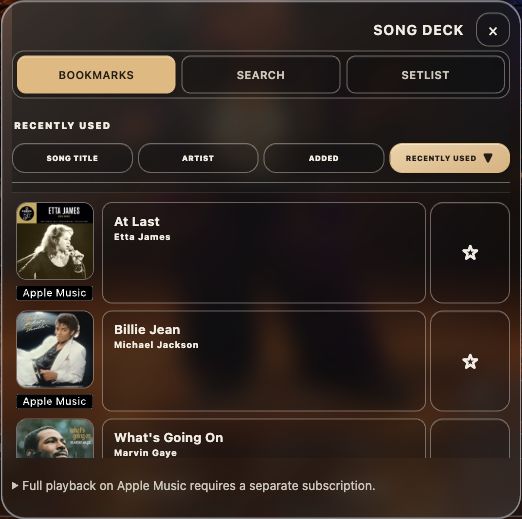
Recall each song’s tempo and rhythm settings, choose clicks or drums, and start. Save your adjusted settings as bookmarks.
Arrange your practice order in a setlist.
Song Deck, bookmarks, and setlists are free.
Song Deck manages practice settings. It is not a music playback or streaming service. Adjust the settings to suit the song or performance.
Read your score and keep time with a smile.
Keep MINI nearby to see and hear the beat.
On iPhone, returning to the Home Screen during playback switches to the mini view and keeps the audio playing. Return to the app to see the full stage again.
On iPhone, MINI appears in a Picture in Picture (PiP) window. Display and controls vary by OS.
Bookmark a song’s tempo and rhythm. Instantly recall your settings for your next practice.
Tune up before practice in the same app. Microphone permission is required.
Start together with a count-in, then practice silent bars with Bar Gap. Make time to keep the beat within yourself.
MINI’s display and controls vary by OS.
Free
Remove time limits for drums and all stages.
The monthly plan renews automatically. Cancel in the settings of the store where you purchased it. The one-time purchase requires a single payment.
Song Deck is a free service. Its features may change, or the service may be suspended or discontinued.
Prices above are base prices in US dollars. Displayed prices vary by region, currency, tax, and store. Check the price and terms shown in your store when purchasing.
On mobile, optional video ads can extend your usage time. Ad availability varies by region, consent, inventory, and other factors. There are no ads on desktop.
Yes. Clicks with both jazz characters and Song Deck are free to use. Song Deck’s features may change, or the service may be suspended or discontinued. Try drums and the other stages within a shared allowance of 5 minutes a day. Time spent stopped does not use this allowance.
Song Deck recalls practice settings for a song. It does not listen to and follow music in real time. For live performances or songs with changing tempos, adjust the tempo and pattern as needed.
Yes—use it for singing, dancing, or rhythm practice too. Start the click with your favorite character and try moving along.
Bluetooth devices and other equipment may introduce audio delay. First try your device’s speakers or a wired connection, then try the sync adjustment in settings.
We’re preparing versions for iPhone, iPad, Android, Mac, and Windows. After launch, check each store for supported OS versions and device requirements.
Bring movement to everyday practice with Grooveman.
The new Grooveman is being prepared for launch. Download links will be available on this page after release.